System requirements
Operating system, recommended hardware, network ports and time synchronisation for a Siwenoid v2 server and its operator PCs.
| At a glance | |
|---|---|
| Operating system | Windows 10 or 11, 64-bit |
| Bundled software | Java 17, MySQL 8.0.19 |
| Port for clients | TCP 8080 (REST) |
| Redundant pair | TCP 8080 and 3306 between the servers |
| Time | NTP on every server |
A Siwenoid v2 system consists of a server computer with its MySQL database and one or more operator PCs running the desktop client. This page lists what these computers and the network need. Check it before you start the installation.
Operating system
Install the server and the clients on 64-bit Windows 10 or Windows 11. Keep Windows up to date.
The installer brings everything else with it: a Java 17 runtime for each program and its own MySQL 8.0.19 database server. Do not install Java, MySQL or any licence dongle software in advance.
Note
The installer also accepts Debian Linux, but some functions, such as the camera viewer and the vendor SDKs of some camera systems, run on Windows only. Plan a Linux server only after agreeing it with Siwena.
Hardware
The program sets no fixed minimum. The values below are a recommendation for a typical site; a site with many datapoints, many operator PCs or many cameras needs more.
| Computer | Recommendation |
|---|---|
| Server (Siwenoid server and MySQL on the same PC) | Current multi-core processor, at least 8 GB of memory, SSD. The server program uses up to about 4 GB, the database 1 GB and more. |
| Operator PC (client) | At least 8 GB of memory and a graphics card with an up-to-date driver: the client draws its screens with hardware acceleration and uses up to 4 GB of memory. |
Disk space:
- Server: at least 8 GB free for the programs and the database, plus room for backups and event log archives. A backup is first assembled next to its destination and then compressed, so the destination drive needs about as much free space as the data itself.
- Operator PC: at least 2 GB free for the client and its updates.
If you plan to load every datapoint into the server's memory at start (see Configuration files), count about 40 KB of memory per datapoint on top.
Preparing Windows
On every Siwenoid computer:
- Switch off sleep, hibernation and turning off the disks. A server that goes to sleep stops processing alarms.
- Install with a Windows user whose name has no spaces and no accented characters.
- The installer needs administrator rights.
- Exclude the Siwenoid folders from virus scanning: the program folder (default
C:\Program Files\Siwenoid),C:\ProgramData\Siwenoidand the MySQL folder (defaultC:\Program Files\mysql-for-siwenoid-v2).
On the server also:
- Give the server a fixed IP address. The clients connect to this address.
- The Siwenoid server is a desktop program that runs while a Windows user is logged on (see Starting the programs automatically).
Network ports
| Port | From → to | Purpose |
|---|---|---|
| TCP 8080 | operator PCs and web clients → server | The server's REST service. This is the only port a client needs. The number can be changed (see Configuration files). |
| TCP 8080 | server ↔ server | A redundant server pair talks over the same REST port, in both directions. |
| TCP 3306 | server ↔ server | Database replication of a redundant pair, in both directions. Also needed from the server to the database when MySQL runs on another computer. |
| device ports | server → devices | Each container connects to its panel or device on the address and port set in its connection parameters. The subsystem pages list the ports of each device. |
| TCP 13487 | local only | The server uses it on its own computer to make sure it runs only once. It must be free; do not open it in the firewall. |
Other needs:
- The PC where the License Utility runs needs internet access (see Licensing). The server itself does not.
- E-mail and SMS messages need an SMTP server or a GSM modem (see E-mail and SMS modules).
- To encrypt the client connections with HTTPS, see REST service and web access.
If an operator PC cannot reach the server's REST port, the client stops before the login window with the message The server's version could not be read: no server answered on its REST API and offers Try again and Close application.
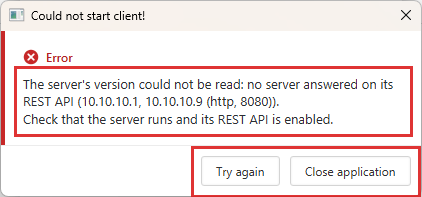
The client cannot reach the server's REST port.
On the server, the REST port is open when the server window lists REST service as Running (see First start).
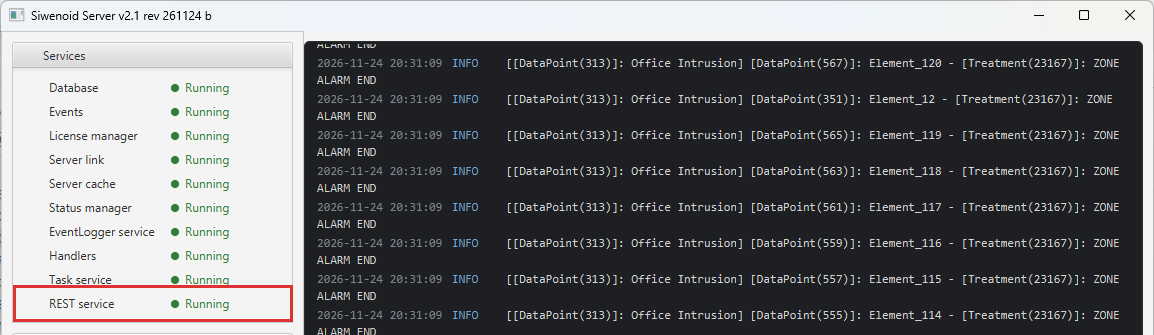
The REST service running in the server window.
Time synchronisation
The client shows the server's clock, and every event log entry carries the server's time. Synchronise the clock of every server with an NTP time source (the Windows time service pointed at your NTP server).
The two servers of a redundant pair refuse each other's requests when their clocks are more than 60 seconds apart. Keep them within a few seconds: handing alarm tasks over to the other server needs a difference well under 5 seconds. The two database servers need the same tight time.
Checklist
- Windows 10 or 11, 64-bit, updated; sleep and hibernation off.
- Windows user without spaces or accents in its name, with administrator rights.
- Enough memory and free disk space; antivirus exclusions set.
- Fixed IP address for the server (for both servers of a pair).
- TCP 8080 open from the operator PCs to the server; for a pair, TCP 8080 and TCP 3306 open between the two servers.
- The device networks reachable from the server.
- NTP time synchronisation on every server.