Configuration files
The server's and the client's config.xml: where they are, how to edit them, and the elements a commissioning engineer changes.
| At a glance | |
|---|---|
| Server file | C:\ProgramData\Siwenoid\ServerConfig\config.xml |
| Client file | C:\ProgramData\Siwenoid\ClientConfig\config.xml |
| Format | XML, UTF-8 |
| Takes effect | at the next start of the program |
Most Siwenoid settings are stored in the database and edited in the Preferences window of the client. A few settings are needed before a program can reach its database or its server: these are in a config.xml file on each computer. The installer creates both files; this page describes the parts an engineer changes.
Where the files are
| File | Location |
|---|---|
| Server configuration | C:\ProgramData\Siwenoid\ServerConfig\config.xml |
| Server log settings and logs | ...\ServerConfig\log4j2.xml, logs in C:\ProgramData\Siwenoid\ServerLogs |
| Client configuration (one per PC) | C:\ProgramData\Siwenoid\ClientConfig\config.xml |
| Client logs | C:\ProgramData\Siwenoid\ClientLogs |
| Database server settings | siwenoid.ini in the MySQL folder (default C:\Program Files\mysql-for-siwenoid-v2); restart the MySQL for Siwenoid v2 service after a change |
| Memory settings of the programs | start_server.cmd and start_client.cmd in the program folders |
The server also keeps files of its own in ServerConfig. Do not delete or edit them.
Editing a file
- Stop the program: the server with Shutdown in its window, the client by closing it. The programs read their
config.xmlonly when they start. - Make a copy of the file.
- Open the file as administrator in a text editor, change it and save it in UTF-8.
- Start the program and check that it works. A mistake in the file can prevent the start; the log tells the reason (see Troubleshooting).
Important
The server's
config.xmlcontains the database password and other secrets. Allow only administrators to readC:\ProgramData\Siwenoid\ServerConfig, and keep server backups, which include this file, just as protected.
The installer's Update keeps both config.xml files, but it overwrites the start scripts start_server.cmd and start_client.cmd. Write down any memory setting you changed in them and apply it again after an update.
The server's config.xml
The file as the installer creates it, with placeholder values:
<Siwenoid>
  <Services>
    <REST port="8080"/>
    <!-- <CCTV/> -->
    <!-- <HotStandby isPrimary="true"/> -->
  </Services>
  <CommunicationService>
    <Server host="127.0.0.1"/>
  </CommunicationService>
  <DatabaseService>
    <driver>com.mysql.cj.jdbc.Driver</driver>
    <url>jdbc:mysql://localhost:3306/SCHEMA</url>
    <user>DATABASE-USER</user>
    <password>DATABASE-PASSWORD</password>
  </DatabaseService>
  <Cache>
    <pre-caching-datapoints>false</pre-caching-datapoints>
    <pre-caching-tree>false</pre-caching-tree>
  </Cache>
  <Task>
    <Map-printer>
      <print-full-path>false</print-full-path>
    </Map-printer>
    <denied-category-dependencies>
      <parent-status-categories></parent-status-categories>
    </denied-category-dependencies>
  </Task>
</Siwenoid>
Services
Each element inside <Services> switches on an optional service of the server. An element inside <!-- --> is switched off.
| Element | Service |
|---|---|
<REST port="8080"/> |
The REST service. Every client needs it, and so does a redundant pair. Keep it on. port is the TCP port (default 8080). |
<CCTV/> |
The server's camera service: turning PTZ cameras to their presets at an alarm (see CCTV cameras (ONVIF, RTSP, Hikvision, Dahua)). |
<HotStandby isPrimary="true"/> |
The redundant server pair; isPrimary is true on the primary server and false on the secondary (see Hot standby server pair). |
Further attributes of <REST>:
| Attribute | Meaning |
|---|---|
ssl-certificate, ssl-certificate-key |
A certificate and its key (PEM files). With both set, the service uses HTTPS. The clients then need https="true" in <RestClient> (below). |
jwt-secret |
A fixed secret of at least 32 characters for the login tokens of web clients. Set it on a production server. |
trusted-proxies |
The addresses of a reverse proxy in front of the server, for web access. |
REST service and web access describes these in detail.
CommunicationService
| Element | Meaning |
|---|---|
<Server host="..."/> |
The server addresses of the system. With a single server the installed 127.0.0.1 can stay. In a redundant pair list both servers, the primary first. |
peerSecret attribute |
Only in a redundant pair: the shared secret of the two servers, at least 32 random characters, the same on both. |
<isPrimaryServer> |
Only in a redundant pair: false makes the containers of this server use their hot standby connection parameters. |
Hot standby server pair describes the setup of a pair. Elements of older Siwenoid versions in this section are ignored.
DatabaseService
| Element | Meaning |
|---|---|
<driver> |
Keep com.mysql.cj.jdbc.Driver. |
<url> |
jdbc:mysql://<host>:<port>/<schema>: the database server, its port and the schema. No further parameters are needed. |
<user>, <password> |
The database user and its password. |
To change the database password:
- Stop the server.
- Change the user's password in MySQL.
- Enter the new password in
<password>. - Start the server and check that the Database service is Running.
A restore in the installer writes these values itself (see Backup and restore).
Cache
Both elements must be present, with true or false.
| Element | Meaning | Installed value |
|---|---|---|
<pre-caching-datapoints> |
true: the server loads every datapoint into its memory at start. The start takes longer and needs about 40 KB of memory per datapoint; the first alarms and screens are faster. |
false |
<pre-caching-tree> |
true: the server loads the datapoint hierarchy at start. |
false |
The datapoints can also be loaded at run time, in Support › Server cache (see Support tools).
Task
| Element | Meaning | Installed value |
|---|---|---|
<print-full-path> |
true: a Print map task also prints the maps of every parent container of the datapoint. |
false |
<parent-status-categories> |
Category priority numbers, separated by commas. While a datapoint's parent has a status of such a category, the operator tasks of the datapoint (opening maps, intervention texts, printing) are skipped. Leave it empty unless Siwena advises a value. | empty |
The tasks themselves are described in Tasks.
Memory
start_server.cmd starts the server with up to 2 GB of heap memory and 2 GB of direct memory. On a large site Siwena may advise higher values.
The client's config.xml
<Siwenoid>
  <Services>
    <!-- <CCTV/> -->
  </Services>
  <CommunicationService>
    <Server host="192.168.1.10" name="Server A"/>
    <Server host="192.168.1.11" name="Server B"/>
  </CommunicationService>
  <!-- <RestClient port="8080" https="false"/> -->
  <Defaults>
    <default-locale>en</default-locale>
    <one-instance>false</one-instance>
  </Defaults>
  <SignalLog>
    <show-removed-statuses>false</show-removed-statuses>
  </SignalLog>
  <Map>
    <auto-open-highlight-buttons-period>5000</auto-open-highlight-buttons-period>
  </Map>
  <OptionalTabs>
    <IntrusionStates/>
    <ForcedActions/>
    <WebBrowser/>
  </OptionalTabs>
</Siwenoid>
The installed file contains a few more elements; leave them as they are.
| Element | Meaning | Installed value |
|---|---|---|
<Server host="..." name="..."/> |
The address of the server; name is shown in the main window's title (Connected to Server A ). The Servers menu lists the servers as the server itself names them (for example Server @ 10.10.10.1). In a redundant pair, one line per server, the primary first: the client finds the serving server by itself. On every PC other than the server, enter the server's address here. |
127.0.0.1 |
<RestClient port="..." https="..."/> |
The REST port of the servers and whether it uses HTTPS. Needed only when the servers do not use port 8080 or use HTTPS; it must match the servers' <REST> setting. |
commented out (8080, HTTP) |
<CCTV/> in <Services> |
The camera viewer on this PC. Without it the client shows no camera functions (see Cameras (CCTV)). | commented out |
<default-locale> |
The language of the login window and of users without a language of their own, as a code such as en or hu. |
the installer's language |
<one-instance> |
true: only one client may run on this PC. |
false |
<show-removed-statuses> |
true: the signal log also shows removed statuses. |
false |
<auto-open-highlight-buttons-period> |
How long, in milliseconds, the buttons of an alarm blink when a map opens by itself (500 to 60000). | 5000 |
<OptionalTabs> |
A listed element makes a view available: IntrusionStates (the Intrusion views), ForcedActions (Forced Actions), WebBrowser (Embedded Browser). Users still need the permission. |
all three |
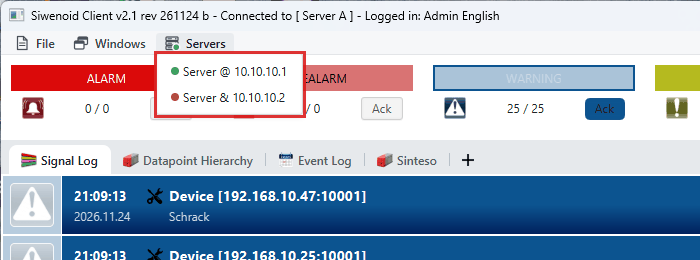
The Servers menu with the servers the server reports, a dot for each showing whether it is reached; the title shows the configured name.
Settings in the Preferences window
Settings that apply to the whole system are stored in the database, not in config.xml. The server-wide ones are on File › Settings › General, tab Server settings: acknowledgement mode, authentication for restarting the server, and MAC address filtering (see System settings).
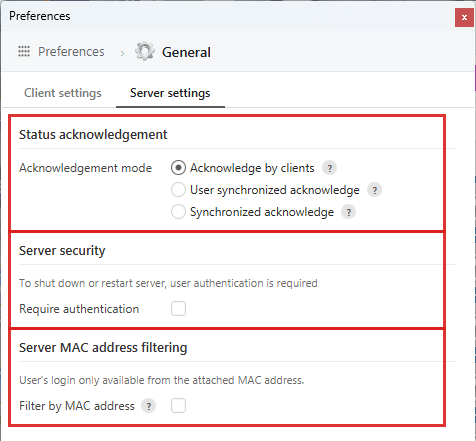
The Server settings tab.