Hot standby server pair
A redundant pair of Siwenoid servers: how it behaves, what it needs (shared secret, time sync, REST, MySQL master-master replication), how to set it up, failover and hand back, and every warning it shows.
| At a glance | |
|---|---|
| Servers | 2 (a primary and a secondary) |
| Serves | one at a time |
| Database | MySQL master-master replication |
| Link between the servers | the REST port (default 8080) and the MySQL port (default 3306) |
| Takeover | about 15-20 seconds, needs a logged-in desktop client |
| Fail-back | by an administrator (hand back) |
A hot standby pair is two Siwenoid servers, a primary and a secondary, running side by side. One of them serves: it saves the event log, takes configuration changes and runs the scheduled work. The other stands by with its own up-to-date copy of the database and takes over when the serving server is lost. The desktop clients log in to both servers and always work with the one that serves.
The rule behind every decision of the pair: operators are never left without alarms because of the election. A server that does not serve still delivers alarms and takes acknowledgements as long as no other server is confirmed serving.
How the pair behaves
- Normal operation: the primary serves, the secondary stands by. Both servers connect to the devices, so the secondary is ready at once. The servers check each other every few seconds over the REST port.
- Clients: every desktop client watches both servers and follows the serving one by itself. The title bar shows the server it is connected to.
- Failover: when the primary is lost, the secondary takes over in about 15-20 seconds. It does so only when a logged-in desktop client confirms that it reaches the secondary but no serving server. A broken link between the two servers alone, while the clients still reach the primary, never makes the secondary take over.
- No automatic fail-back: when the primary comes back, the secondary keeps serving until an administrator hands back the role. This avoids a second interruption at an unplanned moment.
- After a start: the servers wait up to a minute for each other before they decide which one serves.
- Replicated data: what the serving server writes into its database reaches the other database through the MySQL replication. Maps, icons, sounds, branding images and intervention texts are copied between the servers by Siwenoid itself, and caught up after an outage.
- Event log: never lost during a role change. While no server serves, each server keeps its event log rows on its own disk and hands them over once a server serves.
Important
A failed primary is replaced only while at least one desktop client is logged in and reaches the secondary. Keep a client logged in at all times, for example on the control room workstation.
What runs only on the serving server:
| Work | On the server that does not serve |
|---|---|
| Scheduled command tasks, conditional command tasks, scheduled backups, the event log archive | skipped |
| Containers set to Connect only while serving the clients | not connected |
| E-mail and SMS message tasks, camera presets at an alarm | run here too, unless it is certain that the serving server carried them out: a message twice is better than none |
| Configuration changes from the clients | refused; the clients send them to the serving server by themselves |
A pair is not a load balancer: all clients work with the serving server. Licence seats are counted on each server separately.
Requirements
| Item | Requirement |
|---|---|
| Computers | Two Windows computers with fixed IP addresses and a reliable network between them, each with the Siwenoid server and its own MySQL, installed with the installer. The same Siwenoid version on both. |
| Licence | Each server checks its own licence: provide one for both computers (see Licensing). |
| REST service | Switched on on both servers, with the same port and the same HTTP/HTTPS setting (see REST service and web access). |
| Shared secret | The same peerSecret on both servers: 32 or more random characters. |
| Time | NTP time synchronisation on both servers. The clocks must stay within 60 seconds of each other; keep them within a few seconds. |
| Network | Between the servers, both ways: TCP 8080 (REST) and TCP 3306 (MySQL). From every client: TCP 8080 to both servers. |
| Database | MySQL master-master replication: each database is a replica of the other. Distinct server-ids, auto_increment_increment=2, auto_increment_offset 1 on one server and 2 on the other. Classic asynchronous replication only (not Group Replication or Galera). |
| Database user | The user Siwenoid connects with needs the REPLICATION CLIENT and SESSION_VARIABLES_ADMIN privileges, and both databases must be writable for it. |
| Users | The same Siwenoid users on both servers (the replication takes care of it): every desktop client logs in to both. |
The shared secret
The servers sign their messages to each other with the shared secret. The installer cannot make one secret for two computers, so generate it once and paste the same value into both configurations. For example, on any computer with OpenSSL:
openssl rand -hex 32
This prints 64 random characters. Keep the secret like a password. Without a valid secret the servers cannot agree which one serves, and the warning list says so.
Setting up the database replication
Do these steps with both Siwenoid servers stopped. The MySQL installed by Siwenoid runs as the Windows service MySQL for Siwenoid v2; its settings are in siwenoid.ini in the MySQL folder (by default C:\Program Files\mysql-for-siwenoid-v2). The examples use the schema name siwenoid; use yours.
-
MySQL settings. In
siwenoid.ini, in the[mysqld]section, set on the primary:server-id=1 binlog_format=ROW gtid_mode=ON enforce_gtid_consistency=ON log_slave_updates=ON auto_increment_increment=2 auto_increment_offset=1 replicate-wild-do-table=siwenoid.%On the secondary the same, but
server-id=2andauto_increment_offset=2. Restart the MySQL service on both.enforce_gtid_consistencyapplies to every schema of that MySQL: other applications on the same MySQL must respect it. -
Users. On both MySQL servers, as root, create a replication user and give the Siwenoid user its rights:
SET sql_log_bin=0;
CREATE USER 'swnrepl'@'%' IDENTIFIED WITH mysql_native_password BY '<strong password>';
GRANT REPLICATION SLAVE ON *.* TO 'swnrepl'@'%';
GRANT REPLICATION CLIENT, SESSION_VARIABLES_ADMIN ON *.* TO '<siwenoid user>'@'<host>';
If Siwenoid connects as root, the last line is not needed.
-
Copy the database to the secondary. On the primary, in the MySQL
binfolder, dump the schema:mysqldump -u root -p --single-transaction --set-gtid-purged=ON --routines --triggers --events --hex-blob --default-character-set=utf8mb4 --databases siwenoid --result-file=C:\temp\siwenoid.sqlCopy the file to the secondary. There, as root, empty the old schema and the binary log, then load the dump:
STOP SLAVE; RESET SLAVE ALL;
SET sql_log_bin=0; DROP DATABASE IF EXISTS siwenoid; RESET MASTER;
SOURCE C:/temp/siwenoid.sql;
The dump holds all data: delete it from both computers afterwards.
-
Start the replication both ways. On the secondary, point it to the primary; then on the primary, point it to the secondary:
CHANGE MASTER TO MASTER_HOST='<other server>', MASTER_PORT=3306, MASTER_USER='swnrepl', MASTER_PASSWORD='<strong password>', MASTER_AUTO_POSITION=1, MASTER_CONNECT_RETRY=10; START SLAVE; -
Check on both:
SHOW SLAVE STATUS\Gmust showSlave_IO_Running: Yes,Slave_SQL_Running: YesandSeconds_Behind_Master: 0.
The MySQL version installed by Siwenoid uses the SLAVE and MASTER keywords; MySQL 8.0.22 and later also accept REPLICA and SOURCE. If you change auto_increment_increment or auto_increment_offset later, restart the MySQL service and then the Siwenoid server.
Configuring the Siwenoid servers
Edit the server configuration on both computers (C:\ProgramData\Siwenoid\ServerConfig\config.xml, see Configuration files) with the server stopped:
<Services>
  <REST port="8080"/>
  <HotStandby isPrimary="true"/>
</Services>
<CommunicationService peerSecret="(the shared secret)">
  <Server host="192.168.10.11"/>
  <Server host="192.168.10.12"/>
</CommunicationService>
isPrimary="true"on the primary,isPrimary="false"on the secondary. Exactly one server must be the primary.- The same
peerSecretand the same two<Server>entries on both servers, the primary first. <DatabaseService>of each server points to its own MySQL (127.0.0.1), with the replicated schema.
On every client computer list both servers in the client configuration, the primary first:
<CommunicationService>
  <Server host="192.168.10.11"/>
  <Server host="192.168.10.12"/>
</CommunicationService>
Each server keeps a small file hotstandby-epoch next to its configuration. Do not delete it and do not copy it from one server to the other.
Device connections on the secondary
By default both servers connect to a device with the container's own connection parameters. When a device accepts only one connection, or the secondary must reach it at another address:
- On the secondary, add
<isPrimaryServer>false</isPrimaryServer>inside<CommunicationService>. The secondary then uses the hot standby connection parameters of the containers. - In Preferences › Physical structure, open each such container and click Create new Hot Standby communicator. The button is offered only when the server the client works with runs hot standby (
<HotStandby>in its configuration). Fill in the Hot Standby communication parameters (see Physical structure). - Tick Connect only while serving the clients for a device that the secondary may connect to only while it serves. Without it the connection is kept open all the time.
A container without hot standby parameters does not connect on a server that uses them, and the warning list says so.
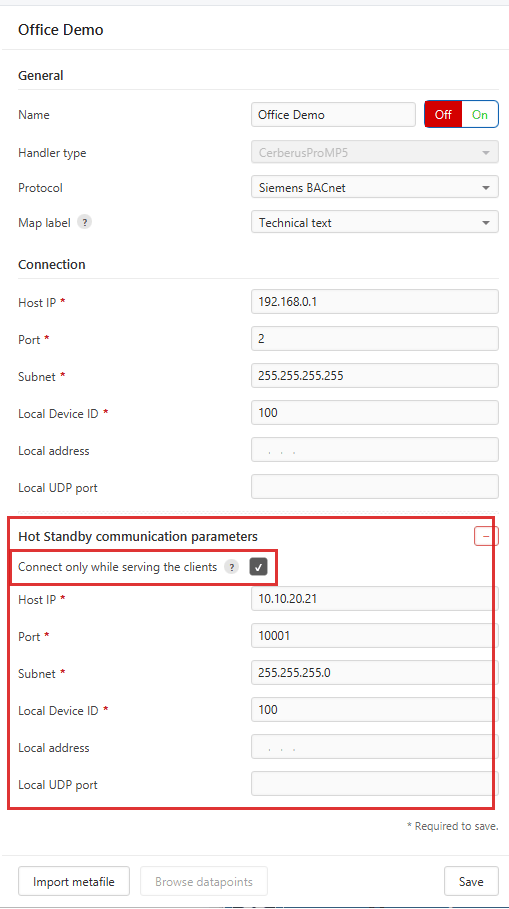
Hot standby connection parameters in the container editor.
Starting and checking the pair
- Start the primary server, then the secondary server, then the clients.
- After about a minute the warning list of the main window must be empty.
- Open File › Settings › Support › License informations. The Servers table shows both servers: one with Primary and serving, the other with Secondary and not serving.

The Servers table of a healthy pair.
A test before handing the site over is recommended:
- With a client logged in, stop the primary server. Within about 20 seconds the secondary serves, the client follows it, alarms keep arriving, and the warning Failover active: the secondary server serves. appears.
- Start the primary again. It does not take the role back by itself. Hand it back (below).
- Stop the replication on one MySQL (
STOP SLAVE;). A replication warning appears within about a minute;START SLAVE;clears it.
Failover and hand back
During a failover the operators see the client move to the secondary within seconds; alarms keep arriving. The warning row Failover active: the secondary server serves. stays until the role is handed back.
After the primary has been repaired and runs again, an administrator hands the role back:
- Check that the primary runs and that the two servers see each other (no warning about the link between them).
- In the warning list, click the hand back button at the end of the Failover active row. The button is shown only to administrators, and only while the primary reaches the secondary.
- The secondary releases the role and the primary takes it. The clients follow, and the row disappears.
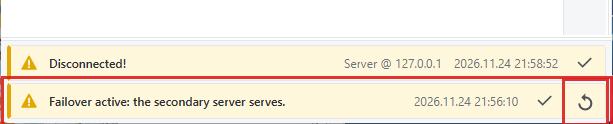
The Failover active warning row with the hand back button.
If the hand back is not carried out, a message tells why:
| Message | What to do |
|---|---|
| Only administrators may hand the serving role back. | Log in as an administrator. |
| The primary serves already. | Nothing to do. |
| The primary does not reach the secondary server; try again once they see each other. | Check the network and the warnings about the link, then try again. |
| The secondary server does not serve (any more). | Nothing to hand back; check the warning list. |
| Hot standby does not run on the primary. | Check <HotStandby> in the primary's configuration. |
| The secondary server did not release the serving role; nothing changed. Please try again. | Try again; if it repeats, check the server logs. |
| The primary did not answer; the role may have been handed back anyway. | Wait a few seconds and look at the warning list. |
Every change of the serving role is written to the event log as a system row Hot standby (address) with Serving role taken or Serving role released and the reason.
Updates and backups
- Update the two servers one at a time, never both at once (see Updates).
- Each server can have its own scheduled backup; only the serving server runs it (see Backup and restore).
- Restoring a member of a pair: restore the serving server, then copy its database to the other server again and restart the replication (steps 3-5 above).
Warnings
The warnings of the pair appear in the warning list of the main window. A condition is reported after it was seen twice in a row, and the database replication is checked every 30 seconds, so a fixed problem leaves the list after about a minute. Changes of the replication state are also written to the event log and the server log.
| Warning | Meaning | What to do |
|---|---|---|
| Hot standby: the channel between the servers is disabled (no valid peerSecret in config.xml); they cannot agree which one serves. | The shared secret is missing or shorter than 32 characters, or the REST service is off. | Set the same secret on both servers, switch REST on, restart. |
| Hot standby: the other server answers but cannot be read (another peerSecret or version?); neither server changes its role. | The secrets differ, the versions differ, or the clocks are more than 60 s apart. | Use the same secret and version on both; check NTP. The server log shows a clock difference as Clock skew. |
| Hot standby: the servers do not reach each other. | The other server is down, or the network or a firewall blocks the REST port. | Start the other server; open TCP 8080 both ways; check the <Server> addresses and that both use the same port and HTTP/HTTPS setting. |
| Hot standby: hot standby does not run on the other server. | <HotStandby> is missing on the other server. |
Add it and restart that server. |
| Hot standby: both servers are configured with the same role; the one with the lower address acts as the primary. | Both servers have the same isPrimary value. |
Set true on one and false on the other. |
| Hot standby: the primary role is not configured clearly (see the server log). | The role is missing or contradictory in the configuration. | Read the server log; set <HotStandby isPrimary> clearly. |
| Failover active: the secondary server serves. | The secondary took over. | Repair the primary, then hand back. |
| Hot standby: BOTH servers serve (split brain)! Check the network between them. | The network split with clients on both sides, or a brief overlap. | Repair the network between the servers; the secondary gives up the role when they see each other again. |
| Hot standby: NO server serves: changes are refused and the event log is kept on the servers until one serves; the alarms are still delivered! | Both servers are starting, or none can decide (for example no client confirms). | Make sure both servers run and the clients reach them. |
| Hot standby: this server does not serve and no other server is confirmed serving: it still delivers the alarms and takes acknowledgements, but refuses other changes; its event log is kept until a server serves! | The other server is down or unreachable, and this one has not taken over (yet). | Bring the other server back, or make sure a logged-in client reaches this server. |
| Hot standby: every configured peer address reaches this server itself (check the hosts in config.xml); the configured primary serves. | Both <Server> entries name this computer. |
Correct the other server's address. |
| Hot standby: the link between the servers works one way only; the configured primary serves. Check the firewalls between them. | One server reaches the other, but not back. | Open TCP 8080 in the missing direction. |
| Hot standby: the other server cannot be read, so the configured primary serves without knowing whether the other one does too. | The other server has been unreadable for some time. | Fix the cause shown by the other warning about the link. |
| Hot standby: some containers do not connect on a server for want of hot standby connection parameters (see the server log). | A server uses hot standby parameters, and some containers have none. | Create hot standby parameters for those containers, or remove <isPrimaryServer>false</isPrimaryServer>. |
| Hot standby: the database replication of a server has stopped or reports an error: the servers' databases drift apart (see the event log and the server log). | A replication thread stopped, cannot connect, or reports an error. | Run SHOW SLAVE STATUS\G on that MySQL, fix the error shown, START SLAVE;. Repair it before the binary logs expire (30 days by default); for errors you cannot resolve, contact Siwena support. |
| Hot standby: the database replication of a server is more than a minute behind. | Slow network or heavy load. | Check the load and the link; the warning clears when the replica catches up. |
| Hot standby: the database replication of a server cannot be checked (the database user needs the REPLICATION CLIENT privilege). | Missing privilege. | GRANT REPLICATION CLIENT, SESSION_VARIABLES_ADMIN ON *.* TO the Siwenoid user. |
| Hot standby: the two servers use different databases and neither replicates the other: their data drift apart. | No replication set up. | Set up the replication. |
| Hot standby: the database replication runs in one direction only: the other server's data does not come back (master-master replication is needed: each database a replica of the other). | One direction is missing or stopped. | Set up or start the replication on the missing side (CHANGE MASTER TO ...; START SLAVE;). |
| Hot standby: the two databases may give new rows the same ids (auto_increment_increment = 2 and auto_increment_offset = 1 / 2 are needed): the replication can stop. | Wrong auto_increment settings. |
Set them in siwenoid.ini, restart MySQL and then the Siwenoid server. |
| REST API connected to server while server is the serving server: switching back once server answers. | The client could not move to the serving server yet. | Usually clears by itself; check that the client reaches both servers. |
| Licence: a server refused this desktop's login because every licensed client seat is taken there; ... | All licence seats of a server are in use. | See Licensing. |

Replication warnings in the warning list.
For general connection problems see Troubleshooting.