Licensing
What the Siwenoid licence covers, the USB licence key, the software licence and the demo licence, licence seats, and how to check and extend a licence.
| At a glance | |
|---|---|
| Licensed | datapoints, clients, servers, validity |
| Forms | USB licence key (usual), software licence |
| Without a licence | 7-day demo |
| Check | File › Settings › Support › License informations |
| Key tool | License Utility |
The Siwenoid licence states how many datapoints the server may handle, how many clients may be logged in at the same time, how many servers it covers and, for a time-limited licence, until when it is valid. The server reads its licence at start and checks it continuously.
To obtain or extend a licence, contact Siwena or your distributor.
What the licence covers
| Item | What counts | When the limit is reached |
|---|---|---|
| Datapoints | The datapoints of licensed types: in general the field devices, such as detectors, inputs and outputs. A camera counts as 4 datapoints. The subsystem pages tell which datapoints of a device count. | The server stops the connection of every container, and no container can be switched on. The client says The number of datapoints exceeds the licence. |
| Clients | The desktop and web clients logged in at the same time: each holds a licence seat (see below). | A further login is refused with Connected clients exceeded the licence. |
| Servers | The number of servers the licence covers. | |
| Validity | A time-limited licence has an expiry date. | A week and a day before the end the server raises a system status; at the end it stops the containers' connections. |
To see which datapoints count, switch on Show licensed icon in File › Settings › Appearance, section Datapoint Hierarchy (see System settings): the datapoint hierarchy then marks them.
How the server gets its licence
Siwenoid is usually licensed with a USB licence key: a USB drive that holds the licence, plugged into the server computer. A software licence, stored in the database and bound to the server computer's hardware, is the exception, for a server where a USB key cannot be used.
The server looks for a licence in this order:
- Software licence. When the database holds a valid one, the server uses only that and looks for no key.
- USB licence key. The server looks for keys every 15 seconds. If the key is removed, the server keeps the key's licence for up to two days.
- Demo licence. Without either, the server runs with a demo licence: 7 days, 2000 datapoints, 2 clients.
USB licence key
A licence key is an ordinary USB drive that the License Utility has turned into a Siwenoid key. The key holds the licence; Siwena creates and renews licences over the internet. The License Utility can run on any PC with internet access, so a server without internet access can keep its key: take the key to such a PC for renewal, then plug it back into the server.
The License Utility is in English. Its window shows:
- the keys found on the computer, on the left;
- the licences of the selected key with their counts and the remaining time, on the right;
- at the bottom, whether it is Connected to Siwenoid License Server.
To prepare a new key:
- Plug the USB drive into a PC with internet access and start License Utility from the desktop. Install it with the installer if needed (see Installation).
- Wait for Connected to Siwenoid License Server.
- Choose Process › Search new keys, select the drive and click Create key.
- Ask Siwena or your distributor to assign the licence to the key.
- When they confirm, choose Process › Maintenance. The licence appears on the key.
- Plug the key into the server computer. The server picks it up within 15 seconds.
To ask for a larger licence:
-
Plug the key into a PC with internet access, start the License Utility and wait for the connection.
-
Select the key, then click the upgrade button on its Siwenoid licence.
-
Enter the new Datapoint count:, Client count: and Server count: and click Send. The tool confirms Upgrade request has been sent.
-
When Siwena or your distributor has approved the request, choose Process › Maintenance, check the new counts and plug the key back into the server.
Process › Maintenance renews every key in the computer from the licence server. It also runs by itself when the tool connects.
Software licence
Use a software licence only where a USB key cannot be used on the server computer. The licence is bound to the server computer's hardware. To order one:
- Log in with a user who may see the licence information, open File › Settings, click the Support tile and open the License informations tab.
- Copy the whole text of the License request field.
- Send it to Siwena or your distributor with the datapoint and client counts you need.
- Siwena provides the licence and tells you how to apply it.
If the server computer is to be replaced, contact Siwena in advance: a software licence does not move to new hardware by itself.
Checking the licence
File › Settings › Support, tab License informations shows the licence of the server the client works with. It is available to users with the Manage Support or View license informations permission.
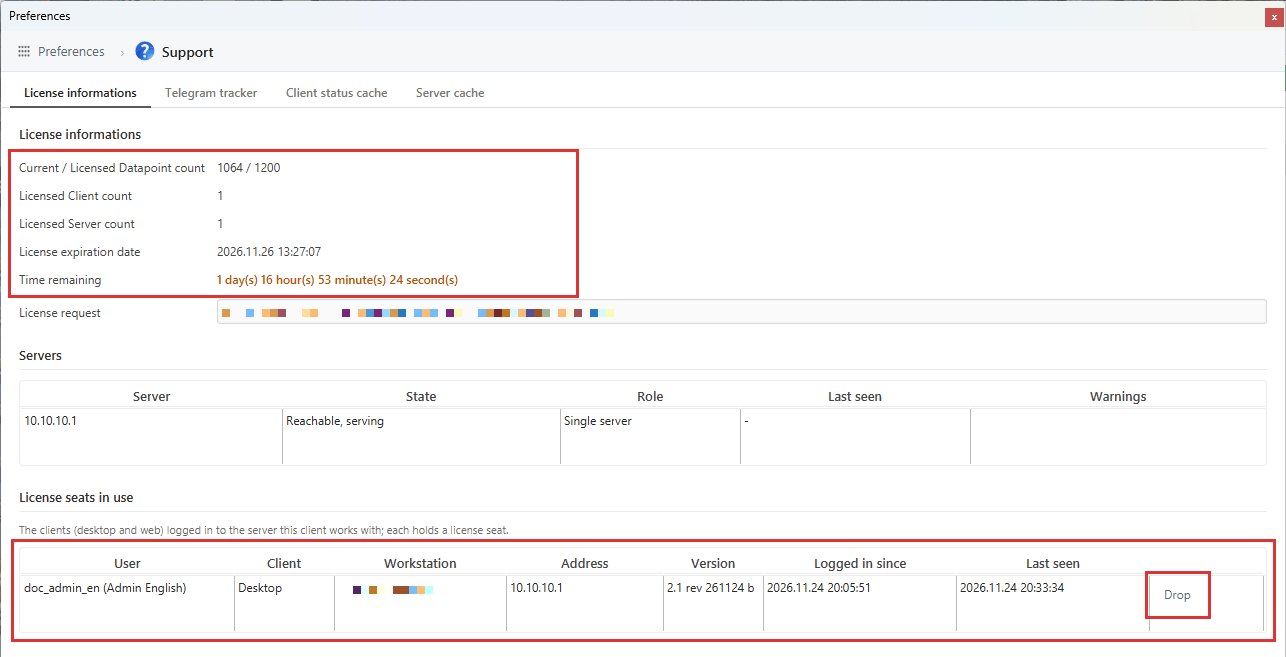
The licence information and the table of the licence seats in use.
| Field | Meaning |
|---|---|
| Current / Licensed Datapoint count: | Datapoints counted now and the licensed number. |
| Licensed Client count: | Clients that may be logged in at the same time. |
| Licensed Server count: | Servers covered by the licence. |
| License expiration date:, Time remaining: | For a time-limited licence. |
| License request | The text to send when ordering a software licence. |
Update informations reads the figures again. The server window shows the same counts in its Datapoints and Clients boxes (see First start).
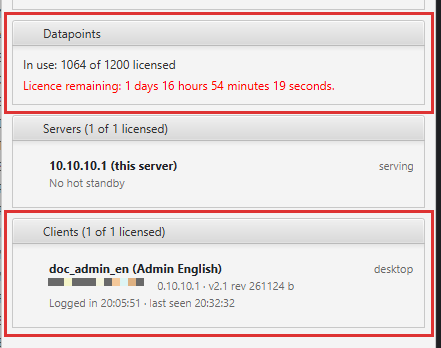
The licence in the server window.
Licence seats
Every logged-in client, desktop or web, holds one licence seat on the server it works with. A seat is freed:
- when the user logs out;
- when a desktop client has not contacted the server for 60 seconds, or a web client for 10 minutes;
- when an administrator drops it.
A client that restarts after a crash takes over its own old seat, so it does not use a second one.
When every seat is taken, a further login is refused. The client shows Connected clients exceeded the licence., keeps the user name and password and tries again by itself; a warning row in the main window says the same. Free a seat or extend the licence.
Administrators see the seats in the License seats in use table of the License informations tab: User, Client (Desktop or Web), Workstation, Address, Version, Logged in since, Last seen. To free the seat of a client that is no longer used, click Drop in its row and confirm. If that client is still running, it logs in again and takes a seat.
Redundant server pair
Ask Siwena how a redundant server pair is licensed.