Paradox EVO, SP and MG (IP150)
Connecting Paradox EVO, SP and MG intrusion panels through their IP150 IP communicator with Siwenoid's own Paradox handlers: choosing the handler type, container parameters, browsing or adding datapoints, treatments and commands.
| At a glance | |
|---|---|
| Manufacturer | Paradox |
| Panels | EVO48, EVO96, EVO192, EVOHD |
| SP4000, SP5500, SP6000, SP65, SP7000 | |
| MG5000, MG5050, MG5075 | |
| Interface | IP150 IP communicator |
| Connection | TCP |
| Handler type | Paradox EVO, Paradox SP, Paradox MG |
| Datapoints | browsed from the panel or added by hand |
| Import | none |
Paradox EVO, SP and MG intrusion panels connect to Siwenoid through their IP150 IP communicator. Siwenoid's own handler talks to the IP150 directly, without any external program. Siwenoid shows the panel, its partitions, zones, doors and PGM outputs as datapoints and follows their states and troubles. Operators can arm and disarm partitions, bypass zones, lock and unlock doors and switch PGM outputs.
For an EVO192 panel connected through a PRT3 module and a serial converter, see Paradox EVO192 (PRT3).
Choosing the handler type
Each of the three panel families has its own handler type. Their connection parameters are the same; choose the handler that fits the panel. A handler does not connect to a panel of another family.
| Panel | Handler type | Protocol |
|---|---|---|
| EVO48, EVO96, EVO192, EVOHD | Paradox EVO | Paradox EVO Protocol over IP150 |
| SP4000, SP5500, SP6000, SP65, SP7000 | Paradox SP | Paradox SP Protocol over IP150 |
| MG5000, MG5050, MG5075 | Paradox MG | Paradox MG Protocol over IP150 |
The Handler type list also offers Paradox API. Do not use it for new installations: use the handler from the table above.
Requirements
- The IP150 is reachable from the Siwenoid server over the network, preferably at a fixed IP address.
- You know the IP150's password and its TCP port. The IP150's factory default port is
10000. - You know the panel's PC password.
- A panel user exists who may arm, disarm and bypass zones, and you know its user code.
Important
Change the factory default IP150 password, the panel's factory PC password and the factory user code before connecting the panel to the site network.
Creating the container
Create the container in Preferences › Physical structure (see Physical structure for the editor in general). Choose the Handler type and the Protocol from the table above, then fill in the connection parameters. All five are required, and they are the same for all three handlers.
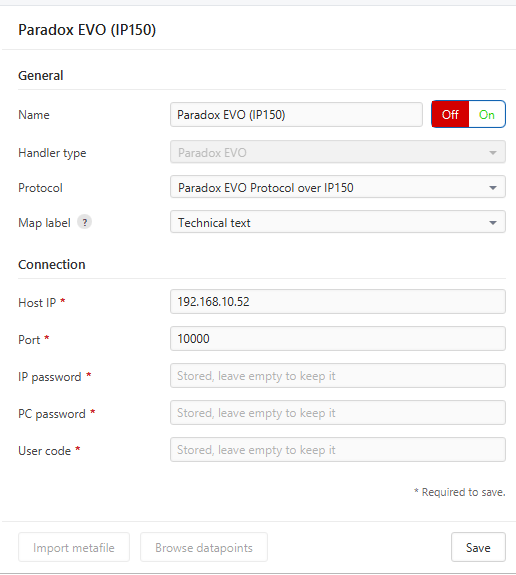
The container editor with the connection parameters of the Paradox EVO handler.
| Field | Meaning | Default |
|---|---|---|
| Host IP | IP address or host name of the IP150. | |
| Port | TCP port of the IP150. | |
| IP password | The IP150's password. | |
| PC password | The panel's PC password. | |
| User code | User code of a panel user. Siwenoid logs in to the panel with it, so the user must be allowed to do what operators do from Siwenoid. |
The three secret fields are write-only: once saved they show Stored, leave empty to keep it.
Save the container and switch it On with the toggle at the top of the editor. Wait until it is connected.
Getting the datapoints
There is no file to import. Get the datapoints in one of two ways:
-
Browse: press Browse datapoints in the container editor (it works only while the container is connected). Siwenoid reads the panel's structure and creates these folders under the panel, with the elements named as programmed in the panel:
- Partitions,
- Zones,
- Doors (EVO panels only),
- PGMs.
In Select datapoints to import, untick what you do not need and press Import.
-
By hand: select the parent in the tree, use Add child, choose the type (
SYSTEM,PARTITION,ZONE,DOOR,PGMorMODULE) and enter the element's number on the panel in Element no..
The panel, the zones, the doors and the PGM outputs count toward the datapoint licence.
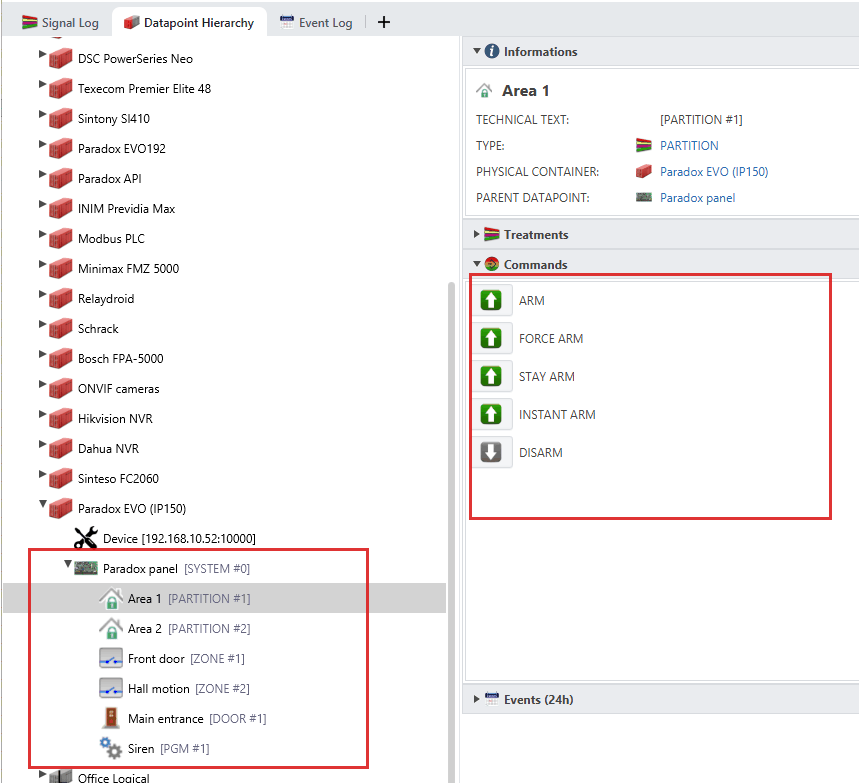
A partition of the Paradox panel selected in the datapoint hierarchy, its commands in the information pane.
Treatments and commands
The treatment files of the Paradox EVO and Paradox MG handlers (paradoxevo.trt, paradoxmg.trt, in the TreatmentTables folder of the Siwenoid server) come with the handlers, and the server loads them by itself at its first start. A file updated later must be imported by hand. The Paradox SP handler has no treatment file of its own: import the treatments and commands by hand before you use the first SP container (see Importing a treatment file). SP and MG panels report the same states, so the MG handler's file (paradoxmg.trt, in the TreatmentTables folder of the Siwenoid server) also fits the SP handler.
The treatment files define these commands (see Datapoint types, treatments and commands to change them):
| Datapoint type | EVO | SP, MG |
|---|---|---|
| SYSTEM | SET DATE AND TIME | SET DATE AND TIME |
| PARTITION | ARM, FORCE ARM, STAY ARM, INSTANT ARM, DISARM | the same, and SLEEP ARM |
| ZONE | BYPASS, CLEAR BYPASS, CLEAR ALARM | BYPASS, CLEAR BYPASS |
| DOOR | LOCK, UNLOCK | (no doors) |
| PGM | RELEASE, ON, OFF, ON OVERRIDE, OFF OVERRIDE | ON, OFF, ON OVERRIDE, OFF OVERRIDE |
Siwenoid does not set the panel clock by itself: SET DATE AND TIME on the panel datapoint sets it to the server's time.
The partitions and zones also appear in the intrusion view.
Checking the connection
- Open a zone on the panel and watch its datapoint in the datapoint hierarchy.
- Arm and disarm a test partition from Siwenoid.
- If the container does not connect:
- check the IP address and port of the IP150, and these fields:
- IP password,
- PC password,
- User code,
- check that the handler type fits the panel (EVO, SP or MG),
- if another program (for example Paradox's programming software) is connected to the IP150, the IP150 may refuse Siwenoid's login: close the other connection.
- check the IP address and port of the IP150, and these fields: