Generic Modbus TCP
Reading device states from a PLC's holding registers over Modbus TCP, for project-specific integrations set up by hand.
| At a glance | |
|---|---|
| Device | a PLC or gateway that publishes states in holding registers |
| Connection | Modbus TCP |
| Default port | 502 |
| Handler type | Modbus-Unsupported |
| Protocol | Modbus/TCP |
| Datapoints | created by hand |
| Import | none |
| Treatments | created by hand |
| Commands | none |
The generic Modbus handler reads holding registers of a PLC or gateway over Modbus TCP and turns the register values into datapoint states. It is meant for project-specific integrations: the PLC programmer and the Siwenoid engineer agree on a register table, and the datapoints and treatments are set up by hand. It is not a ready-made driver for a particular device, which is why it is listed as Modbus-Unsupported in the Handler type list. It only monitors: no commands are sent to the PLC.
What you need from the PLC programmer
A register table that lists:
- the holding registers Siwenoid should read (a continuous range),
- which device each register belongs to, and the name to show for it,
- the values a register can take and what each value means (for example
0normal,1alarm,2fault).
Holding register numbers are entered without the leading 4: register 40101 is entered as 101.
Creating the container
Create the container in Preferences › Physical structure (see Physical structure for the editor in general). Choose Modbus-Unsupported as Handler type and Modbus/TCP as Protocol.
| Field | Meaning | Default |
|---|---|---|
| Host IP | IP address of the PLC. Required. | |
| Port | Modbus TCP port of the PLC, usually 502. Required. |
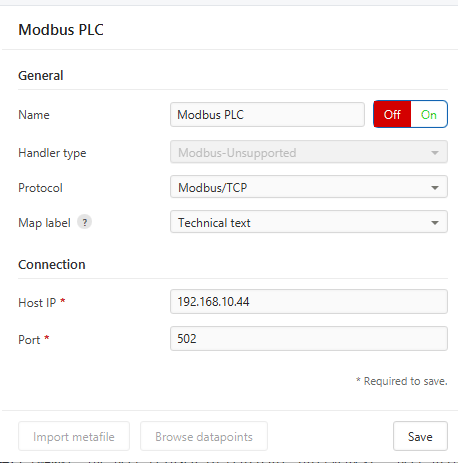
The container editor with the Modbus/TCP connection parameters.
Save the container. The datapoints go into two containers under it: a physical one for the register ranges and a logical one for the devices. Siwenoid may have created them already; if not, add them with Add child, one of type TYPE_PHYSICAL_CONTAINER and one of type TYPE_LOGICAL_CONTAINER.
Adding the register range and the devices
-
Under the physical container, add a datapoint of type
TYPE_PHYSICAL_DATAPOINTfor the register range. Enter the first register in Address Low and the last one in Address High. Siwenoid reads every register in this range, both ends included. Add more such datapoints for further ranges.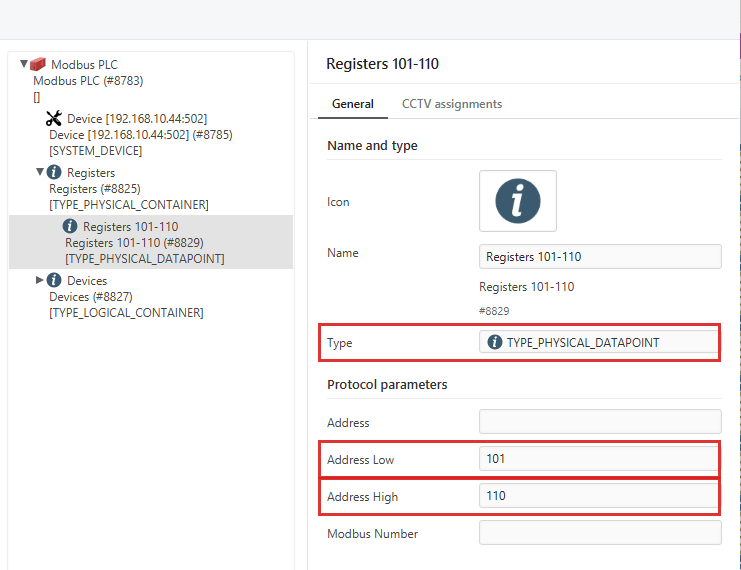
The register range: Address Low and Address High. -
Under the logical container, add a datapoint of type
TYPE_HOLDING_REGISTERfor every device in the table. Give it the device's name, and enter the device's register number both in Address and in Modbus Number. The register must lie inside a range from step 1.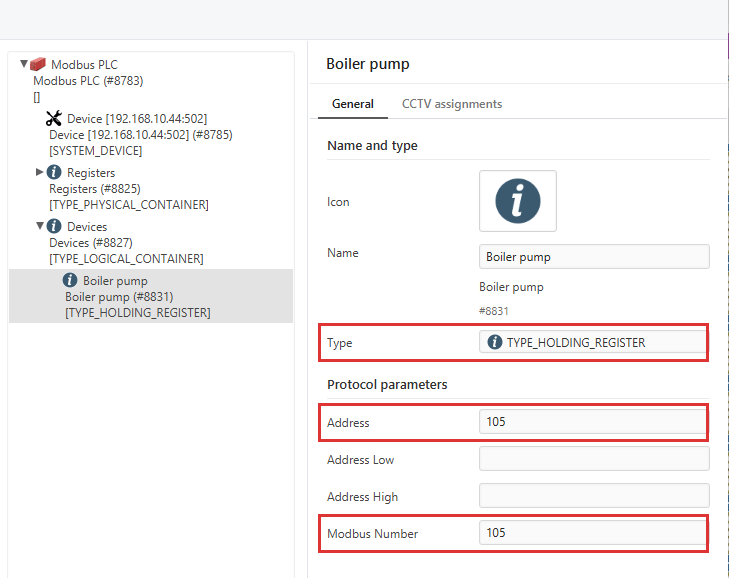
A device datapoint: the same register number in Address and Modbus Number.
Example for registers 40101 to 40110, with a device on register 40105:
- the range datapoint: Address Low
101, Address High110, - the device datapoint: Address
105, Modbus Number105.
Other encodings, such as single bits of a register, are possible; agree them with Siwenoid support.
Treatments
The handler comes with no default treatments and no treatment file: create every treatment by hand before you switch the connection on. In Preferences › Datapoint types, select the Modbus-Unsupported handler and the TYPE_HOLDING_REGISTER type, and add a treatment for every value in the register table (see Creating and deleting treatments):
- State: the register value the treatment stands for (0 to 254).
- Choose a category, and tick every box of the Effect mask, so that each new value replaces the previous status (only an administrator can change the effect mask).
Give every treatment of the handler a different State value. A value with no matching treatment changes nothing.
Warning
Do not use Import treatments for this handler. The import deletes the treatments created by hand on the handler's types and creates none.
Checking the connection
- Switch the container On with the toggle at the top of the editor.
- Change a register on the PLC (or ask the PLC programmer to) and watch the device's datapoint in the datapoint hierarchy.
- If nothing changes, check the IP address and port, that the register lies inside a range, and that a treatment exists for the value.